

I got the chance to check out two beautifully designed wired controllers that have the look and feel of official Xbox controllers. Third party controllers are usually not that popular, with people leaning towards the official versions, but I can say that for wired gaming PDP have got things right.
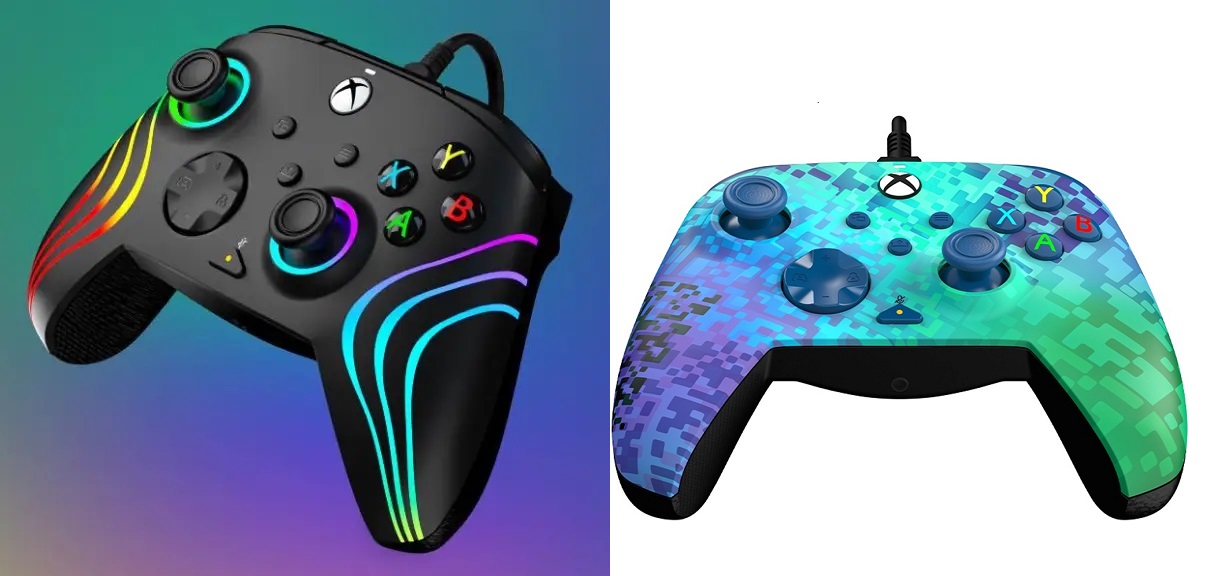
I was trying out two different PDP controllers – the Black Afterglow Wave and Rematch Glitch Green. The Glitch Green is my five-year-old son’s favourite as its colours and geometric design reflect those of a Creeper in Minecraft! The Black Afterglow is solid black but, let’s not beat about the bush, has beautiful RGB lighting effects. It’s slightly more expensive that the Glitch Green because of this, but otherwise the controls have the same feel and features.
They both have a very sleek and beautiful design, working on both the Xbox Series X|S and PC. The controllers are comfortable to hold, feel sturdy and have their own dedicated share button like the normal Xbox controllers so you won’t have to worry about missing any of those epic gaming moments.
The controllers are a lot lighter than your standard controller, mainly due to the lack of batteries, but this lack of weight doesn’t make them feel cheap at all. At first the difference does feel very strange but after a while you definitely get used to it. They also have what they call a “laser-etched” texture on the grips, thumbsticks and triggers for extra comfort, and I have to say it is a great inclusion.
You will need to download the standalone PDP app from the store, but within this app the controllers start to shine. As soon as you plug your controller in it will recognise exactly which type it is and if any updates are due. If there are, it will force you to do it before you can even play with the settings, but it’s quick – for me it was less than a minute.
The app on both PC and console are the same and are pretty simple and easy to use. Each configuration setting gives a brief explanation of what setting on the controller you are changing and how to do it. You have the ability to customize your controller from re-mapping the buttons to adjusting the dead zone (the area of the analog stick that will not be read by the controller). And with the Black Afterglow Wave, you can completely customize the colours that glow on the device.
One of my favourite features is the built-in audio controls for quick adjustments. I sometimes like to use my wired headset and I tend to like to have myself muted as I mumble and talk to myself sometimes, so with a quick click of a button I can do that.
For the Black Afterglow, the app allows you to have 4 different lighting effect profiles. You can map it to just be one basic colour or you can have the 8 different areas on the controller their own unique colour. I enjoyed having a play, trying out different styles and effects I would want my controller to be. I even gave my son a go at picking different colours (he went full rainbow FYI).
If you run the PDP app on your PC it will store the settings you select for the controller, meaning that if you plug it into your Xbox later you are ready to go without having to install the app.
The downside is that you are unable to have different profiles for the remapping of buttons. So if you did want to do any re-mapping for specific games, you will need to do this every time you change games, which I know could be frustrating for some people. For me, the main one I hate is clicking in the left and right analog stick, so for me just mapping that is perfect. I do feel that this could be something simple for them to add in the future as it’s more of an app update than the hardware of the controller.
If you find yourself having any issues with the controller you can also use the app to run diagnostics like checking each button is working correctly or the vibration is operational. If there are any problems, it also has a built in help section with an easy to navigate FAQ.
I have wanted a wired controller for a long time as I also do a lot of PC gaming due to the wonders of PC Game Pass. Using an Xbox controller for this is fine, but if you have it wired it can be a nightmare as it’s not really designed for it. The cable at the back always comes loose or breaks. However, the PDP ones come with a very sturdy 8 foot detachable USB-C cable and when attached it feels nice and secure and I don’t ever feel like I am going to break it. The controllers also come with one month of Xbox Game Pass which is a wonderful added bonus for the best deal in gaming.
Conclusion
These wired PDP Controllers are fantastic. They are comfortable to use and the app is user friendly and full of features, plus the changes you can make to the colours in the Afterglow are a lot of fun. Yes, people love and are accustomed to wireless these days, but I can’t really fault what PDP have done where. These will 100% be my go-to PC controllers and definitely will be useful if I ever want to do two player on my Series S.

Hardware provided by the manufacturer for review purposes.Want to keep up to date with the latest Xt reviews, Xt opinions and Xt content? Follow us on Facebook, Twitter, and YouTube.




SonnRJS
I can’t update the firmware on my new controller as the app hasn’t worked since the back end of 2022. Their online ‘support’ is offline and none existent, they can’t even be bothered to reply to emails! Terrible app, controller & company. Avoid!
Grandpa
The haven’t contacted me either
Grandpa
Same here, app doesn’t work,just freeze’s up every time…no matter how many restarts or clearing the cache, safe mode. It’s a dead app
Zulu
Second controller I bought within 2-4 months and the trigger caved in again and just broke on me. I don’t play any games aggressively as I only play RPG’s and it’s perma-stuck. Breaks too easily so I’m assuming cheaply made.
MemyselfNeye
Its an exact replica of an Xbox controller, so using it on pc is totally different. On pc you probably have more options on setting it up.
But as an Xbox one controller in many ways a pain in the ars.
I dont even use the app its so useless.
But I guess if all you’re playing is minecraft, solitaire or srabble, its the ideal controller
The two HUGE buttons underneath that you constantly push when you squeeze the controller during a tense game is one of the worst parts of that controller. Constantly pressing one or the other on accident.
I had played a hitman contract, and was trying to beat a time, when I was right there, finally had it down with like two seconds ahead, when I squeezed and pressed the button, causing agent 47 to squat down, ruining my time.
I had done that same contract over 10 times when it happened and I just had enough of this piece of JUNK, that I literally stuck my finger tips in and pulled the buttons right out, snapping them right off.
I should’ve done that months ago.
Two big holes, but not using two USELESS buttons.